Stop Losing Sites.
Start Pinning Them.
Every browser has bookmarks. Yours has Pin Pal.
Save once. Access forever.
★★★★★ Free • No account required • Works instantly
 Search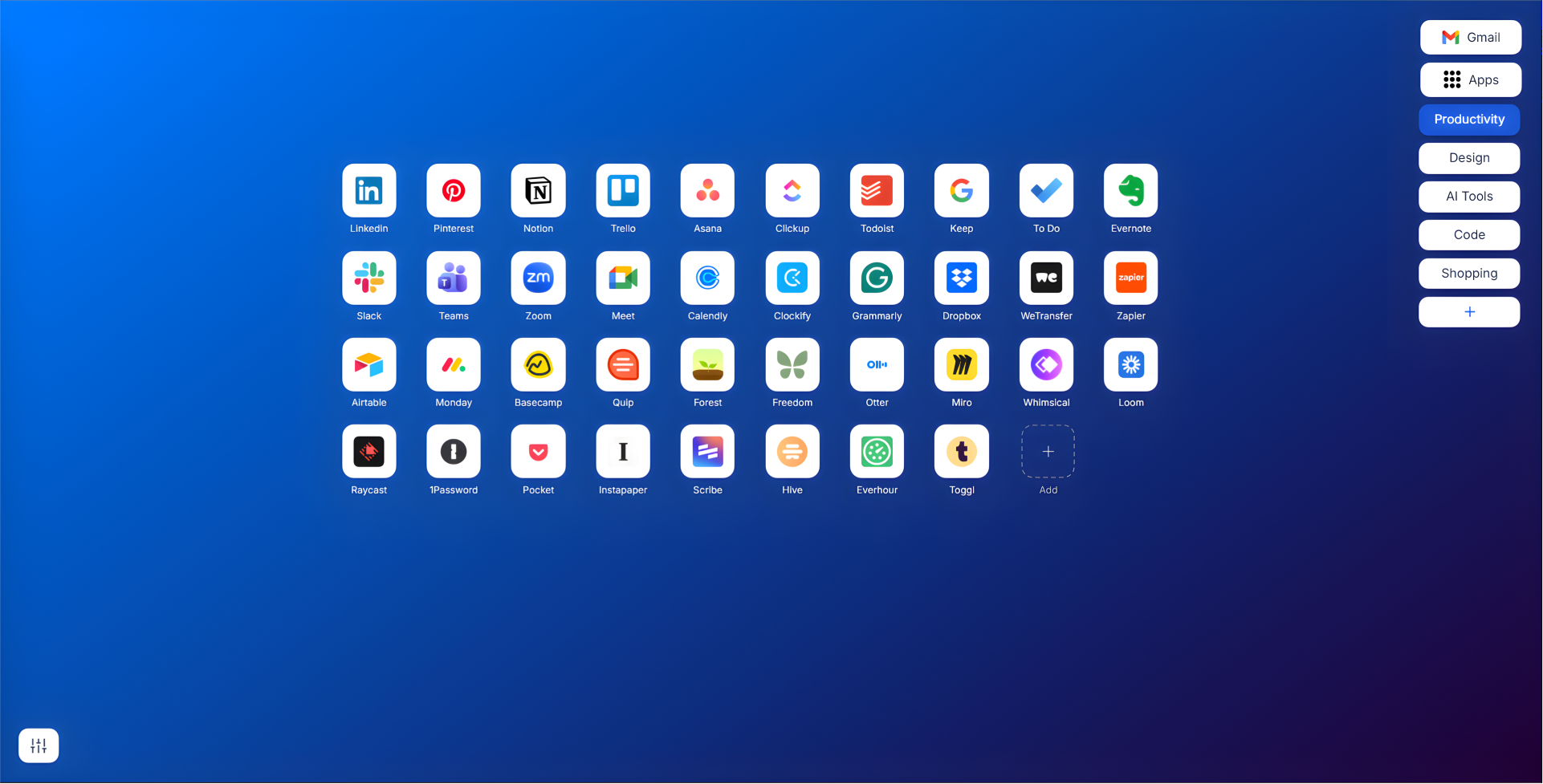
One-Click Save
Click the toolbar icon on any site. Title and URL auto-fill — hit Save and it appears on your new tab.
Unlimited Shortcuts
No caps, no limits. Save every website you visit — tools, references, social — all in one place.
Your Background
Pick any color or upload your own wallpaper. Your background is saved and applied to every new tab.
Popular Sites
Sites people actually pin
These are just some of the sites Pin Pal users save every day. If you visit it, you can pin it.
















Features
Everything you need, nothing you don't
Eight focused features. One purpose: get you to your websites faster, every single time you open a new tab.
One-Click Save
Click the Pin Pal toolbar icon on any website. Title and URL are auto-filled — just hit Save. Your shortcut appears on your new tab instantly.
Smart Categories
Create custom groups like AI Tools, Design, Code, or Shopping. Filter your shortcuts by category from the right sidebar in one click.
Custom Backgrounds
Set any solid color or upload your own image as a wallpaper. Your preference is saved and applied automatically.
Unlimited Shortcuts
No caps, no limits, no upgrades needed. Save every site you visit — all in one place.
Privacy First
Everything stored locally on your device using Chrome's built-in storage. No account, no server, no data collection.
Google Apps Access
Gmail and Google Apps shortcuts are always one click away from the top-right corner of your new tab.
Drag & Arrange
Organize your shortcuts exactly how you want them. Drag and drop to reorder freely within any category.
Import & Export
Control your data. Export all your shortcuts to a JSON file and import them back on any browser or device.
Frequently Asked Questions
Everything you need to know about Pin Pal, the ultimate browser shortcut manager.
Pin Pal is a free Chrome extension that replaces your default browser new tab page with a customizable productivity dashboard. It allows you to save unlimited website shortcuts, organize them into named categories, and customize the background to perfectly fit your workflow, directly from your new tab.
Saving shortcuts is effortless. When you're on a website you want to keep, simply click the Pin Pal extension icon in your toolbar, and it automatically grabs the site's title and URL. You can assign it to a category (like 'Design', 'AI Tools', or 'Work') and save it in one click. All saved links appear instantly on your new tab page.
Yes, Pin Pal is a 100% free Chrome extension. There are no paid plans, no subscription tiers, and no hidden fees. All features—including unlimited shortcut storage, custom backgrounds, and categorization—are available completely free forever.
Pin Pal is built with a strict privacy-first architecture using Chrome Manifest V3. All your saved shortcuts, categories, and settings are stored locally on your device via chrome.storage.local. We never collect, track, or sync your browsing data to external servers.
Absolutely! You can fully customize your dashboard's appearance. Choose from a range of clean solid colors, or upload your own high-resolution image wallpapers to make your browser new tab truly yours.
Unlike traditional hidden bookmark folders, Pin Pal turns your saved links into a highly visual, easily accessible dashboard every time you open a new tab. Instead of digging through menus, your most-used sites are grouped, sortable, and just one click away, significantly speeding up your workflow.
Pin Pal is Free.
Forever.
No Free plan. No Pro plan. No limits. Every feature is available to every user from day one — always.
★★★★★ Trusted by users worldwide